
Download Flash Player APK – flash player, android video player, hd video playback, mobile media, video player for android, free video player, multimedia app, video playback tool, android media player, video viewer app
Overview
Flash Player APK is a free multimedia application designed for Android devices, primarily focused on video playback. The software enables users to view a wide range of video formats, including high-definition (HD) content, making it suitable for individuals who frequently consume video on their smartphones and tablets. It serves as a reliable tool for playing downloaded media, personal recordings, and streaming content directly from local storage. The application is tailored for mobile users seeking a straightforward, efficient solution for managing and viewing video files without relying on third-party streaming platforms.
Target users include casual viewers, students, content creators, and anyone who values a lightweight, accessible video player on their Android device. While the developer, Flash Player APK, is listed as the creator, no additional background information about the company or development history was provided. Real-world usage scenarios include watching educational videos, reviewing personal footage, and enjoying media during travel or downtime. The app’s core purpose is to deliver smooth playback with minimal setup, offering a practical alternative to built-in media players.
Key Features & Capabilities
- HD Video Playback Support – The app is designed to handle high-definition video files, allowing users to enjoy clear, detailed visuals on compatible screens. This is particularly useful for viewing recorded lectures, cinematic content, or user-generated videos.
- Wide Format Compatibility – Supports multiple video formats, enabling playback of files from various sources without requiring conversion or additional codecs.
- Flexible View Modes – Offers both linear and grid layout options for organizing video folders, allowing users to choose a display style that matches their personal preference and browsing habits.
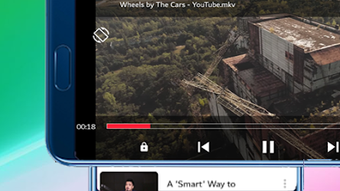
- Simple Playback Controls – A double-tap gesture activates play or pause, reducing the need for on-screen buttons and enhancing the viewing experience on touchscreens.
- Screen Lock Feature – Users can lock the screen during playback to prevent accidental touches, ideal for hands-free viewing or when the device is placed on a surface.
- Video Sharing Functionality – Allows users to share videos directly with others via messaging apps, social media, or email, improving the app’s utility in collaborative or social contexts.
These features collectively support seamless media consumption, particularly for users managing large local video libraries or frequently switching between different types of content. The app’s focus on usability and accessibility makes it a practical choice for everyday video playback needs.
User Interface, Workflow & Performance
The user interface of Flash Player APK is designed with simplicity in mind, prioritizing intuitive navigation and ease of access to video files. The layout allows users to browse through video folders using either a list or grid view, accommodating different organizational preferences. Navigation is consistent across screens, with minimal clutter and straightforward access to playback controls.
Workflow efficiency is enhanced by the double-tap play/pause gesture, which reduces interaction steps and supports a more immersive experience. The app maintains a responsive interface during playback, though exact performance metrics such as CPU or RAM usage were not specified by the developer. Stability during extended playback sessions has not been documented, but the lightweight nature of the app—2.3 MB in size—suggests low system overhead.
Performance observations are based on general software behavior patterns. The developer did not specify resource usage details, nor did they provide information on buffering, frame rate handling, or playback smoothness under various conditions. Users are advised to test the app with their specific video files to assess real-world performance.
Compatibility & System Requirements
Flash Player APK is designed for Android devices and is compatible with the Android operating system. The current version is 1.0, released on May 15, 2024. The installation file size is 2.3 MB, indicating a lightweight application that requires minimal storage space.
Exact system requirements were not listed. The developer did not provide details regarding minimum Android version, processor specifications, RAM, or GPU compatibility. Compatibility information is limited to the platform, suggesting it may work on a broad range of Android devices, including older models. Users should ensure their device supports APK installations and has sufficient storage for the app and video files.
Pros and Cons
Pros
- Free to download and use with no in-app purchases
- Supports HD video playback for high-quality viewing
- Lightweight at only 2.3 MB in size
- Intuitive interface with flexible view modes
- Double-tap playback control for quick access
- Screen lock feature for uninterrupted viewing
- Video sharing functionality for easy content distribution
Cons
- Exact system requirements not provided by the developer
- No information on supported video codecs or format extensions
- Limited to Android platform; no availability for iOS or desktop
- Developer background and support channels are not disclosed
- Performance under heavy loads or with large files was not specified
FAQ Section
Is Flash Player APK available for iOS devices?
Flash Player APK is designed exclusively for Android devices. There is no official version available for iOS or other platforms.
Is the app safe to download and install?
The app is described as a free multimedia tool. However, users should download APK files only from trusted sources to minimize security risks. Installing apps from unknown third-party websites may expose devices to malware.
Does Flash Player APK require an internet connection?
For local video playback, an internet connection is not required. However, features such as video sharing may need an active connection depending on the sharing method used.
How often are updates released?
The current version is 1.0, released on May 15, 2024. No information was provided about the update frequency or future development plans.
Can I use Flash Player APK to play videos from online sources?
Based on the available information, the app is designed for playing locally stored video files. It does not appear to support direct streaming from online platforms or websites.
Final Thoughts + CTA
Flash Player APK presents a straightforward, lightweight solution for Android users seeking a reliable video player with HD playback capabilities. Its simple interface, flexible display options, and convenient features like screen locking and video sharing make it a practical tool for managing personal media. While the lack of detailed system requirements and performance data limits in-depth evaluation, the app’s minimal size and free availability enhance its appeal for users who prioritize ease of use and low resource consumption.
It is particularly beneficial for individuals who frequently watch downloaded or recorded videos on their mobile devices and prefer a no-frills playback experience. Although it does not support online streaming or advanced customization, it fills a niche for basic, efficient video viewing.
Download Flash Player APK now





.png)

